
Description
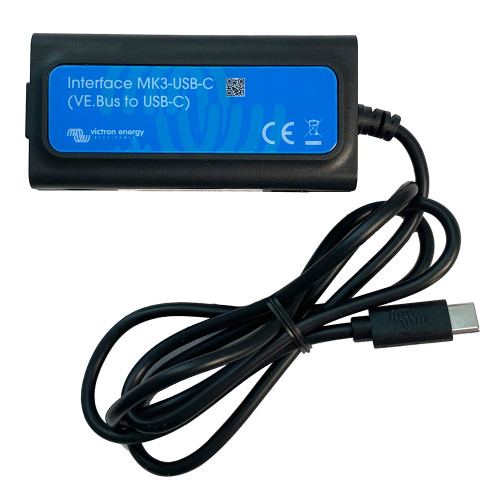
Victron Interface MK3-USB-C VE.Bus Adapter | Boat Supply Store
Directly interface with advanced Victron Energy VE.Bus power systems using the modern USB-C connection offered by the Victron Interface MK3-USB-C. This adapter is crucial for configuring inverter/charger settings, updating firmware on devices like the MultiPlus-II and Quattro, and performing diagnostics for complex marine electrical architectures. It provides a reliable link for technicians and owners to manage critical power components, ensuring optimal performance on vessels operating in challenging offshore environments.
Key Features
- Direct USB-C connectivity for modern systems
- Simplifies configuration and firmware updates
- Compatible with a wide range of VE.Bus devices
- Essential for Multi, MultiPlus, Quattro, and more
- Enables diagnostics for complex power setups
- Reliable connection for critical system management
- Modern interface standard for future-proofing
- Plug and Play installation for immediate use
Specifications
| Product Specifications | |
|---|---|
| Connectivity | USB-C |
| Supported Devices | Multi, MultiGrid, MultiPlus, MultiPlus-II, Quattro, VE.Bus BMS V2, ECOmulti, EasySolar, EasyPlus, Inverters with VE.Bus communication port |
| Purpose | Configuration and firmware updates |
Who This Is For
Marine technicians and boat owners requiring direct computer access to configure, update firmware, or diagnose Victron Energy VE.Bus power solutions. It is ideal for individuals managing sophisticated electrical systems on vessels ranging from sportfishers to cruising catamarans.
How It Compares
| Feature | Victron Interface MK3-USB-C VE.Bus Adapter | Competitor |
|---|---|---|
| Connectivity | USB-C | USB-A, RS485 |
| Primary Function | Configuration and firmware updates via USB-C | Configuration and firmware updates via USB-A, Communication via RS485 for system integration |
| Modern Port | Yes (USB-C) | No (USB-A), No |
Common Concerns Answered
Are there any known issues with this interface?
While overwhelmingly positive, some users have reported occasional driver installation complexities on specific operating systems, though these are typically resolved with the latest VictronConnect software.
Do I need special software to use the Victron Interface MK3-USB-C?
Yes, to fully leverage the configuration, firmware update, and diagnostic capabilities of the Victron Interface MK3-USB-C, you will need to install Victron's proprietary software, such as VictronConnect, on your computer.
I prefer universal cables, is the proprietary cable a problem?
The interface utilizes a modern USB-C port, common on many contemporary devices, ensuring a robust connection. While it requires specific Victron software, the USB-C connection itself is a widely adopted standard for enhanced data transfer and power delivery.
Frequently Asked Questions
What specific Victron devices are compatible with the Victron Interface MK3-USB-C?
The interface supports a broad range of Victron VE.Bus devices, including the Multi, MultiGrid, MultiPlus, MultiPlus-II, Quattro, VE.Bus BMS V2, as well as Inverter/Charger settings within ECOmulti, EasySolar, EasyPlus, and compatible Inverters that feature a VE.Bus communication port.
What is the primary function of the Victron Interface MK3-USB-C?
Its primary function is to establish a direct digital link between compatible Victron Energy VE.Bus power management devices and a computer, facilitating essential tasks such as system configuration, firmware updates, and diagnostic troubleshooting.
Are drivers required for the Victron Interface MK3-USB-C to operate?
Yes, while it's designed for plug-and-play simplicity, drivers are typically installed automatically when connecting to a computer, or may require the installation of the VictronConnect software for optimal performance and full functionality.
Does the Victron Interface MK3-USB-C work with every Victron VE.Bus product ever made?
The interface is designed for current and recent Victron VE.Bus products that utilize the VE.Bus communication protocol. It is crucial to verify that your specific Victron device possesses a VE.Bus communication port for compatibility.
Can I use the Victron Interface MK3-USB-C to monitor my Victron system in real-time?
While the interface's primary role is configuration and firmware updates, the accompanying VictronConnect software, used in conjunction with the MK3-USB-C, does provide real-time monitoring capabilities for many supported VE.Bus devices, offering insights into system status and performance.